
Canva: Complete Guide, Features, Tools & Design Tips 2026

Canva is a versatile online design and visual content creation platform that helps users create professional-looking graphics without requiring advanced design skills. It provides templates, photo editing tools, presentations, social media designs, videos, documents, websites, and AI-powered creative features in one workspace. From beginners creating simple Instagram posts to businesses producing branded marketing materials, Canva offers tools for a wide range of creative needs.
What Is Canva and How Does It Work
Canva is a cloud-based graphic design platform developed to make visual content creation accessible to beginners, creators, marketers, students, and professional teams. For more guides about photo and video editing tools, photo and video editing resources can also help users explore different creative applications. Instead of building every design element from scratch, users can start with a template and customize its text, images, colors, layouts, and graphics. The platform works through a browser and also provides applications for supported desktop and mobile devices.
The main idea behind Canva is simplicity. Users can select a design format, choose a template, and modify individual elements through a visual editor. Its drag-and-drop interface makes it easy to move images, resize objects, change fonts, add shapes, apply effects, and arrange different components on the canvas. This workflow allows users to create designs quickly without needing extensive knowledge of professional design software.
also supports many types of creative projects beyond traditional graphics. Users can create presentations, posters, flyers, invitations, resumes, social media posts, thumbnails, videos, documents, websites, and other visual materials. Because many tools are available within the same platform, creators can move between different content formats without learning a completely different application.
Canva Templates and Design Tools
Templates are one of the most important parts of Canva because they give users a ready-made foundation for their projects. Instead of beginning withTemplates are one of the most important parts of Canva because they give users a ready-made foundation for their projects. Instead of starting with an empty canvas, users can search for templates based on a specific purpose, style, platform, or content type. A template can then be customized with personal images, text, colors, logos, and other elements.
Canva provides templates for numerous categories, including:
Instagram posts and stories
YouTube thumbnails
TikTok and social media graphics
Presentations and slides
Posters and flyers
Business cards
Resumes and CVs
Invitations
Brochures
Infographics
Marketing materials
Documents
Websites
Video projects
Templates can significantly reduce the time required to create a polished design. However, users should customize templates instead of simply replacing one image and publishing the result. Changing fonts, colors, photographs, spacing, and layouts can make the final design more closely match a personal or business identity.
Canva Photo Editing Features
Canva provides a range of photo editing features that make it easy to enhance images directly within a design. Key features include:
- Brightness and Contrast: Adjust the brightness and contrast of your photos to make them clearer and more balanced. This is useful for correcting images that appear too dark, too bright, or lack visual depth.
- Saturation Control: Increase or decrease color intensity to create a more vibrant or muted appearance. It can help make photographs look more colorful while keeping the overall design visually appealing.
- Blur Effects: Apply blur effects to soften an image or create separation between the subject and background. This can also be useful for creating attractive backgrounds for social media graphics.
- Sharpness: Increase sharpness to make important details and edges appear clearer. It can help improve the appearance of slightly soft images when used carefully.
- Filters: Canva offers different filters that can quickly change the overall tone and mood of a photograph. They provide an easy way to create a consistent visual style across multiple images.
- Photo Effects: Creative effects can transform the appearance of photographs by adding different visual styles and treatments. These effects can be useful for social media posts, promotional graphics, and creative projects.
- Background Removal: Background removal allows users to isolate the main subject from its original background. This is especially useful for product images, portraits, advertisements, and social media designs.
- AI-Assisted Editing: AI-powered editing features can simplify tasks that traditionally require more manual work. They can help creators make quick adjustments and experiment with different visual ideas.
- Crop and Resize: Cropping helps remove unwanted areas and focus attention on the main subject of a photograph. Images can also be resized to fit different social media posts, banners, presentations, and other design formats.
- Rotate and Flip: Users can rotate photographs to correct their orientation or achieve a better composition. The flip option can create a horizontal or vertical mirror effect when needed.
- Transparency: Transparency controls allow users to make an image partially see-through. This can help blend photographs with backgrounds, overlays, text, shapes, and other design elements.
- Creative Design Integration: One of Canva’s major advantages is that edited photographs can be combined with text, graphics, shapes, templates, stickers, and other elements in the same project. This makes it easier to create complete designs without switching between multiple applications.
Users who need more advanced photo manipulation and professional image-editing capabilities can also explore Adobe Photoshop complete guide for a deeper look at layers, masks, selections, retouching, compositing, and AI-powered editing.
Canva is useful for quick photo adjustments and design-based editing, but photographers who need more advanced RAW processing, professional color correction, photo organization, masking, and detailed image development may prefer a dedicated photography editor. Adobe Lightroom provides a photography-focused workflow with tools designed for detailed image enhancement and professional photo management.
If you are looking for another online photo editing and design platform, you can also explore our Fotor Complete Guide. Fotor provides a range of photo enhancement, retouching, AI-powered editing, templates, and creative design tools that can be useful for beginners, content creators, and users who want quick image improvements without a complicated editing workflow.
Canva AI and Magic Studio
Artificial intelligence has become a major part of Canva through its collection of AI-assisted creative tools. Canva’s Magic Studio brings together features designed to help users generate, edit, transform, and organize visual content more efficiently. These tools can assist with tasks that previously required several manual editing steps.
AI capabilities can help users generate content from prompts, transform existing designs, create visual elements, edit images, and produce written content. Depending on the available feature and plan, users may be able to describe an idea and receive generated design or content suggestions. This can be particularly useful during the early stages of a project when a creator needs ideas or a starting point.
Canva AI tools are most effective when treated as creative assistants rather than complete replacements for human design decisions. Generated results can require editing, fact-checking, formatting adjustments, or visual refinement. Users should review AI-generated content carefully and make sure the final design matches their intended message, brand, audience, and visual identity.
Canva for Social Media Content
Canva has become particularly popular among social media creators because it provides tools for producing content for multiple platforms from one interface. Users can create Instagram posts, stories, YouTube thumbnails, TikTok graphics, Facebook content, Pinterest designs, and other social media assets using customizable templates and design elements.
A strong social media workflow starts with selecting the correct dimensions and format for the target platform. After that, creators can add photographs, text, logos, graphics, icons, and other visual elements. Consistent colors, fonts, and layouts can help establish a recognizable visual identity across multiple posts.
Canva can also help creators maintain consistency by allowing reusable brand elements and templates. Businesses can create standardized designs for announcements, promotions, educational posts, product launches, and other common content. This saves time because creators do not need to rebuild the same visual structure every time they publish something new.
Canva Video, Presentations and Documents
Canva is not limited to static images. Its video tools allow users to create short videos, presentations with motion, promotional content, social media clips, and other visual projects. Users can combine video clips, images, text, music, animations, transitions, and other elements through a visual editing interface.
For presentations, Canva provides templates and layouts designed for business meetings, education, marketing, portfolios, and other purposes. Users can customize slides with images, charts, icons, text, animations, and branding elements. This makes it possible to create visually engaging presentations without designing every slide manually.
The platform also supports documents and other content formats, allowing users to combine written information with visual elements. This broad range of formats makes Canva useful for businesses and individuals who need to produce multiple types of content. A marketing team, for example, can create social graphics, presentations, documents, promotional materials, and other assets from the same platform.
Canva Branding, Collaboration and Professional Workflows
Branding tools make Canva particularly useful for businesses and professional teams. Users can establish consistent brand colors, fonts, logos, and other visual elements so that designs maintain a recognizable appearance. Brand-focused workflows can reduce repetitive work and help multiple team members follow the same visual guidelines.
Collaboration is another fundamental aspect of Canva. Teams can work on shared designs, provide feedback, make changes, and coordinate creative projects thanks to built-in collaboration features. This is particularly useful for marketing departments, agencies, educational institutions, and businesses that require input from multiple people during the content creation process.
Regarding professional workflows, Canva also streamlines the production of recurring content. A company can create reusable templates for social media campaigns, presentations, advertisements, internal documents, or promotional materials. Once these structures are in place, team members can adapt them for new campaigns without having to start from scratch.
Exporting, sharing, and accessibility in Canva
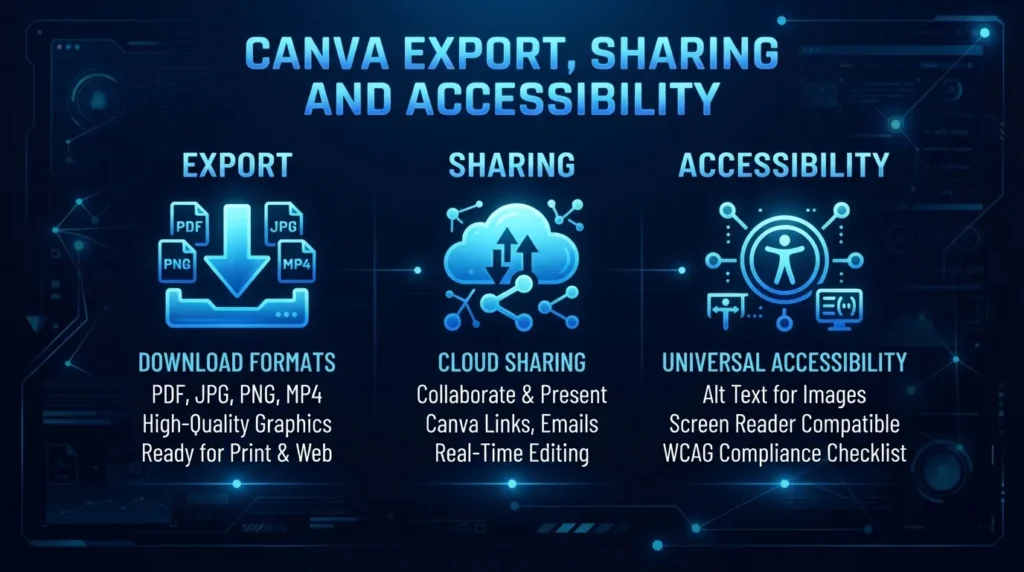
Canva offers various options for sharing and exporting finished designs. Depending on the project and available features, users can download their designs in formats such as PNG, JPG, PDF, and other compatible file types. Video projects can also be exported using available formats and settings.
Sharing options allow designs to be sent to others for viewing, collaboration, or editing. This is especially practical when a design requires approval before publication. Teams can review content, provide feedback, and make adjustments without relying solely on external workflows for file sharing or communication.
Another major advantage of Canva is its accessibility. Since much of the platform operates via web browsers and compatible apps, users can work on their designs without needing to install complex professional design software packages. This makes the platform accessible to students, small businesses, content creators, and beginners looking for powerful creative tools without the hassle of a complicated initial setup.
Conclusion
Canva has evolved into a comprehensive visual content creation platform that combines graphic design, photo editing, video creation, presentations, documents, templates, brand management, collaboration, and AI-powered features. Its “drag-and-drop” interface makes many creative tasks accessible to beginners while offering the flexibility needed by businesses, marketers, educators, and content creators. Templates streamline production, while customization tools allow users to create designs that align with their visual identity.
For those seeking a simple way to produce various types of digital content, Canva offers a highly practical “all-in-one” workflow. Its AI tools can accelerate creative tasks, while templates and brand management features enable more efficient production of recurring content. While it may not replace specialized professional software for every advanced editing task, its combination of accessibility, flexibility, and extensive creative features makes it a key tool for modern digital content creation.



2 Comments